The Neeve Portal uses a hierarchical structure to organize resources and manage access, leveraging the concept of inherited access down a branch of the hierarchy. Instead of creating and maintaining groups, you assign permission sets directly to users, removing the burden of group management. These permission sets define access at specific levels of the hierarchy, from broad organization access to individual endpoint connections.
Hierarchy management is required in the new portal and includes the following levels:
Org: The top level of the hierarchy, containing all assets and hierarchy elements.
Portfolio: A flexible grouping used to align with your organization’s business logic or other preferred model. You can create up to five layers of nested portfolios.
Site: A physical location where nodes are assigned. When creating a site, you’ll be prompted to enter a street address. After creating a site, you can move it to a different portfolio, if necessary. This will all move all resources contained in that site.
System type network: A way to categorize LAN networks on nodes by primary purpose or supported system (BMS, Access Control, Lighting, Amenities, etc.). this classification simplifies user access to specific types of endpoints on those networks.
Endpoint: A physical device on the networks that has an IP address (e.g., a BMS server). Granting access to an endpoint automatically includes access to all its defined connections.
Endpoint connection: The specific protocol connection that enables remote access to an endpoint. You can grant access at this level for maximum granularity.
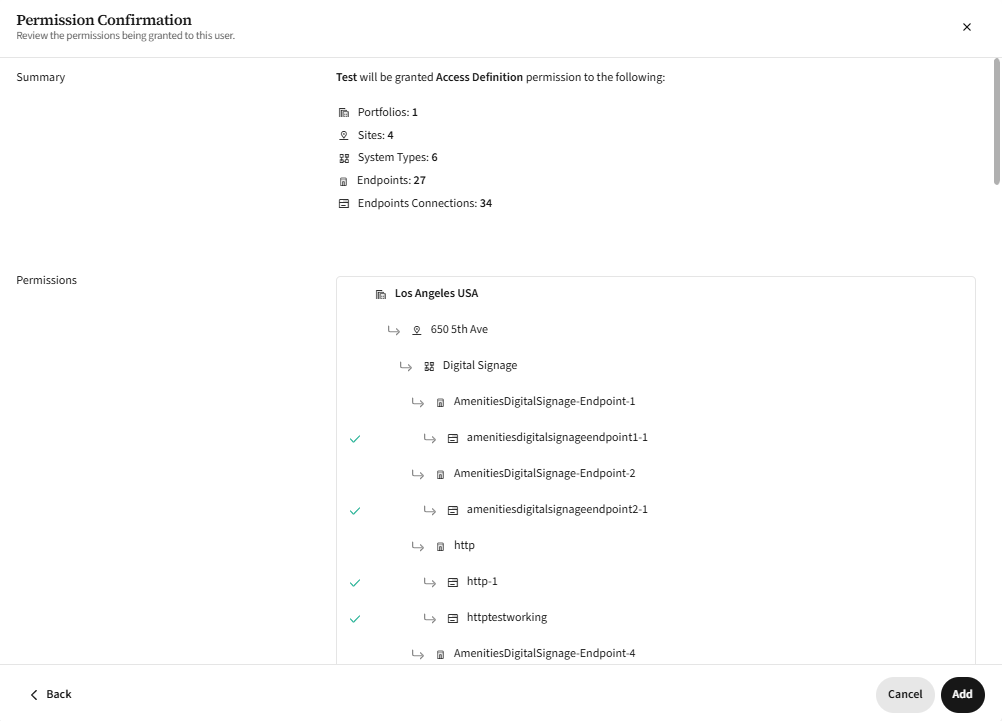
As an example, if you assign a user permissions to a single portfolio, that user will have access to all endpoints within that portfolio—including any endpoints and connections that are added in the future. However, they will not be able to see or access endpoints in other portfolios unless explicitly granted additional permissions. This inheritance model applies to all levels of the hierarchy. The following screenshot shows an Access permissions set for the Los Angeles site, where the user inherits permissions to all connections under all portfolios, system types, and endpoints of that site.
To learn more about how hierarchy integrates with user permissions, see User roles.