Neeve’s unified platform integrates Secure Edge, intelligence, cloud services, and an applications marketplace and provides a modular framework for operational technology (OT) and cyber-physical systems (CPS) cybersecurity, zero-trust remote access, secure cloud connectivity, and application hosting. Secure Link delivers industrial-grade secure connectivity and remote access, while Secure Edge adds network security, cloud integration, and edge computing for real-time building operations. Together, these capabilities reduce complexity, strengthen security, and enable efficient system management.
Read more to learn about the current capabilities of the Neeve Portal and the Neeve Remote Access Agent desktop and mobile apps.
The Neeve Portal
The new Neeve Portal represents the first step in a more efficient and unified experience. Over the coming months, we’ll continue expanding its functionality, with the goal of achieving full feature parity between the Secure Edge and Remote Access portals.
Remote access
The new portal is a complete replacement for the existing Remote Access portal. You can add endpoints, connections, and users, and grant users access to these endpoints. For existing customers, we will support your transition to migrate data over and get started quickly.
Users can access their assigned endpoint connections through the Launcher page. (The new Launcher page is similar to the version released in Remote Access v24.05.) Read more about how to access your endpoint connections.
Node onboarding and Remote Access onboarding flow
We’ve introduced a simplified onboarding flow for your Edge Nodes. The flow includes steps for connecting to the internet, defining a LAN network, and onboarding endpoints and endpoint connections.
Node management
You can use the portal to onboard nodes and create LAN networks. For detailed instructions, see Provision and launch Edge Nodes.
Note that the following use-cases are not yet supported:
Advanced networking management, including security policies and static routing
Mapping to Cloud Connectors hosted in your private cloud or on premises.
Cloud Connector mapping is automated to map to Remote Access Cloud Connectors only, and is currently limited to a single Cloud Connector per LAN network.Creating, deploying, or managing services on nodes. (Edge compute)
For more information, see Neeve Portal limitations in the administrator guide.
Endpoint management
Endpoint onboarding and management are streamlined with on-demand network scanning. The portal includes an improved process for onboarding an endpoint with a known IP address. For more information, see Adding endpoints in Neeve.
User management
Add and manage users who need access to endpoints (Remote Access Portal replacement).
Note that there are some important changes to how access is managed. Groups are no longer used. Instead, assign access to endpoints and endpoint connections at the user level using the new hierarchy model. For more details, see Hierarchy in Neeve and Adding and modifying users.
Hierarchy management
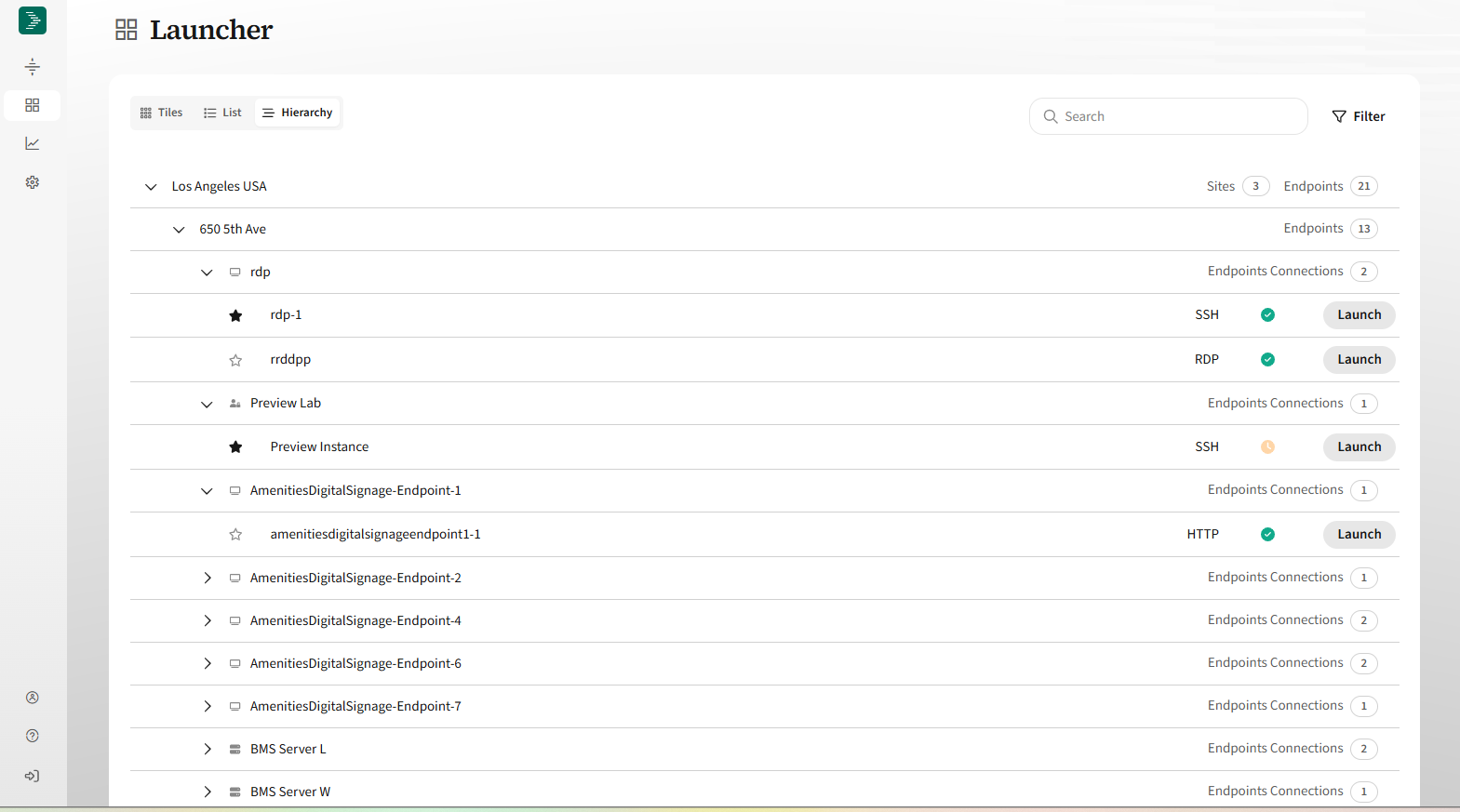
Hierarchy management is required in the new portal and is now integrated with user permissions for greater flexibility. The new hierarchy leverages the concept of inherited access to resources down a branch of the hierarchy, with the goal of reducing the burden of access management. The following screenshot shows resources in the Launcher, organized by hierarchy. For more information, see Hierarchy in Neeve.
Neeve Remote Access Agent applications
In addition to the browser-based portal, we developed the Neeve Remote Access Agent desktop and mobile apps, which provide secure, remote access to building systems and OT devices without the need for complex setup or extra hardware. Designed for technicians, operators, and system integrators, these apps make it easy to connect to your organization’s endpoints from a mobile device or computer, and are ideal for connecting to older or thick-client applications that do not run in a web browser.
Key capabilities include:
Simple, secure access: Quickly connect to building systems and OT devices from anywhere using a phone, tablet, or desktop.
Support for common protocols: Connect using HTTP, HTTPS, SSH, or RDP, with no special configuration required.
Centralized management: Neeve Admins can manage user access, view activity logs, and monitor sessions in real time through the Neeve Portal.
Optimized performance: Built in partnership with Cloudbrink, a leader in Hybrid Access-as-a-Service (HAaaS), to deliver fast, reliable remote access for field teams.
Download the apps
Desktop: The desktop application is available for download within the portal by clicking on a TCP connection tile. See Accessing your endpoints for more information.
Android: Download the “Neeve Remote Access” app from the Google Play Store on your Android devices. (Available soon.)
iOS: Download the “Neeve Remote Access” app from the App Store on your iPhone or iPad. (Available soon.)